High-Res Logo (512px)
Official high-resolution branding logo for publication use.
Download PNG ↓Developed by an independent developer, QuickRemote for Roku is a native, privacy-first Windows remote client that bridges your desktop workflow with your home entertainment for a subscription-free, lifetime license of just $1.29.

Official high-resolution branding logo for publication use.
Download PNG ↓
The native Windows client application layout icon.
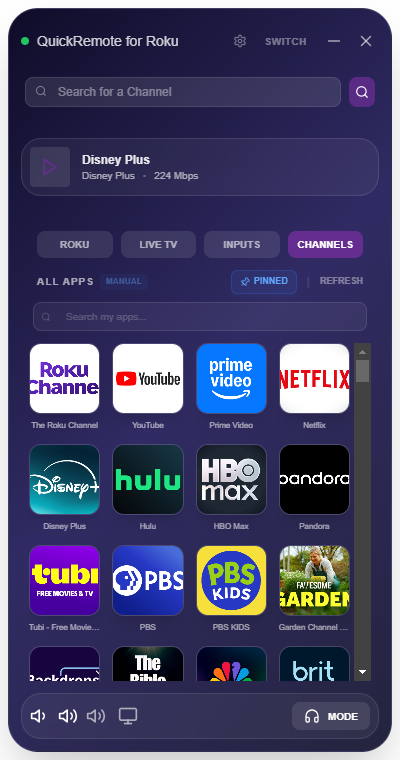
Download PNG ↓UI showing the 4-across app grid, active media player, and sorting controls.
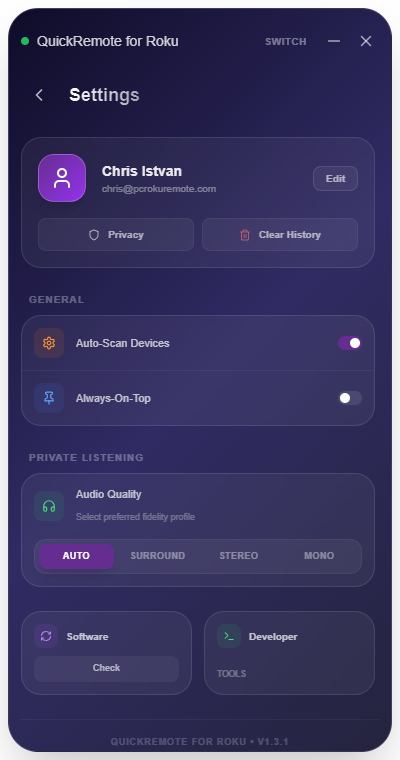
Download PNG ↓UI displaying the Always-On-Top toggle, audio profile overrides, and check update tools.
Download PNG ↓"Exactly what I was looking for. No subscriptions, super fast typing on my TV using my PC keyboard, and the Private Listening actually works silently in the background."
Cord Cutters News recently reviewed and featured QuickRemote for Roku, emphasizing its speed, native keyboard sync, and reliable desktop private listening.
Adds customizable channel pinning & sorting grids, native hardware media key routing, and an Always-On-Top window toggle for custom desktop layouts.
View Feature Highlights →Introduces multi-channel 5.1 Surround Sound Private Listening, real-time Dynamic Adaptive Streaming (DAS), and zero-copy RTP socket optimizations.
View Feature Highlights →Overhauls the app channel listings into a rapid 4-across responsive grid with real-time text filters and fast disk metadata storage.
View Feature Highlights →Condenses remote navigation, app launching, and direct television input switching into a zero-scrolling 3-tab layout.
View Feature Highlights →Brings Windows screen-casting overlays alongside manual static IP connection boxes, bypassing VPN and firewall blocks.
View Feature Highlights →Our historic architectural launch establishing native real-time TV sound streaming directly into a user's Windows headphones.
View Feature Highlights →Join other power users and control your Roku TV with zero latency, native keyboard sync, physical media key routing, and Private Listening.
Get QuickRemote for Windows ($1.29)One-time lifetime purchase. No subscriptions. Free future updates.