QuickRemote for Roku continues to refine the desktop-to-TV control experience. Today's release of Version 1.3.1 (The Interaction & Playback Update) delivers a collection of highly requested power-user features: customizable channel reordering, keyboard media key routing, and flexible window locking for a truly seamless multitasking experience.
🕹️ Take Control of Your Media & Workspace
Version 1.3.1 focuses on tactile, physical interactions, closing the loop between your computer's input devices and your TV's interface. Whether you are adjusting your app grid layout or controlling sound levels while editing a document, this update makes the remote adapt to your workflow.
📌 1. Interactive Channel Sorting & Pinning
Your channel grid, your rules. The Channels tab now features a dedicated Pin icon that completely changes how you interact with your app grid:
- Dynamic Mode (Unpinned): The app grid automatically sorts your channels dynamically by your most recently watched apps. Your favorites automatically drift to the top-left based on real usage.
- Custom Grid Mode (Pinned): Pin your channels to freeze the grid. Once pinned, you can manually drag and drop channels into your own perfect custom grid layout, keeping your favorite apps exactly where you expect them.
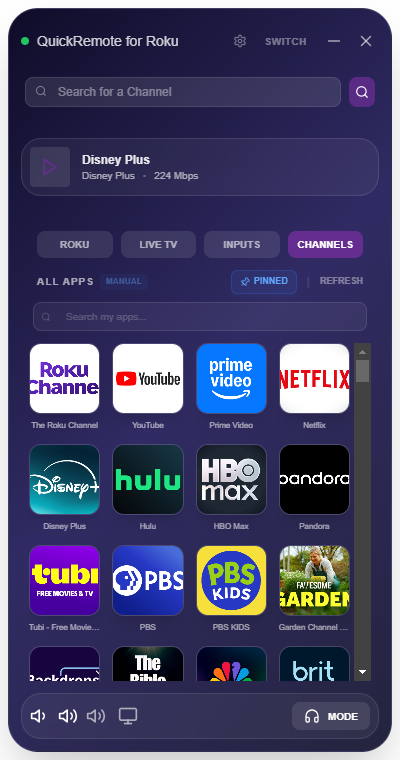
The redesigned v1.3.1 Channels tab, showing pinned sorting controls and the high-speed 4-across app grid.
🎵 2. Hardware Media Key Routing
Adjust volume and control playback directly using the physical media keys built into your PC keyboard (Play/Pause, Stop, Skip, Mute, Volume Up/Down). The smart routing system behaves dynamically based on your audio state:
- Private Listening Enabled: When streaming TV audio through your PC, your keyboard volume keys automatically adjust the local PC system volume.
- Private Listening Disabled: When watching TV out loud, your volume and playback keys bypass local controls and route seamlessly directly to your television over your network.
💻 3. Always-On-Top Window Toggle
QuickRemote has traditionally featured a locked Mini-Overlay mode that kept the remote hovering over all active windows. With v1.3.1, a new general setting lets you choose your layout style:
- Toggle Off (Flexible Workspace): Disable "Always-On-Top" in the General Settings menu to allow QuickRemote to behave like a standard Windows app, resting quietly behind other active windows when it loses focus.
- Toggle On (Mini-Overlay Mode): Lock the window on top of your workspace to monitor playback, mute commercials, or check volume levels without ever having to Alt-Tab away from your current task.
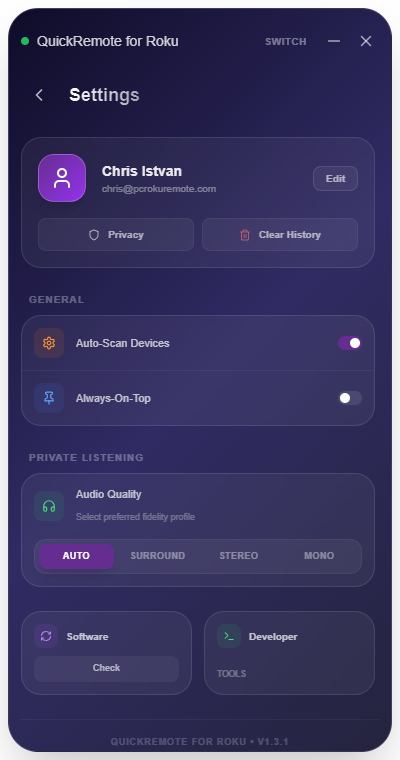
The redesigned settings panel showing the new Always-On-Top toggle switch and private listening audio quality profiles.
🛠️ Enhanced Core Foundations
Version 1.3.1 incorporates all of the performance breakthroughs established in the v1.3.0 core architecture:
- Cinematic Private Listening: Enjoy immersive 5.1 surround sound on your PC headset using high-fidelity Opus codecs and adaptive bandwidth profiles (Surround, Stereo, Mono, Auto).
- Instant Smart Clipboard: Copy long links or passwords on your PC and paste them directly into any text field on Roku with a single click.
- Network Power Control (WOL): Boot up your television from your computer with robust Wake-on-LAN commands.
About QuickRemote
QuickRemote is developed by an independent developer dedicated to building the most private, rapid, and utility-dense Roku remote client for Windows. We stand behind a "privacy-first, ads-never" promise, with zero tracking, zero remote accounts, and zero cloud dependencies.
QuickRemote is available as a one-time lifetime license for $1.29 on the Microsoft Store. Buy once, own forever, with all future updates included for free.