If you've ever controlled a Roku streaming device or Roku TV from a computer, you already know the unmatched convenience of typing passwords, launching apps, and controlling volume directly from your workstation. But as our entertainment centers expand, managing an ever-growing list of channels and routing audio between devices can introduce unnecessary friction.
In the latest v1.3.1 update, QuickRemote is introducing two powerful, tactile features designed to make desktop control feel completely organic: Interactive Channel Drag and Drop Sorting & Pinning and Hardware Media Key Routing.
📌 Interactive Channel Sorting & Pinning
In previous versions of QuickRemote, we introduced a responsive 4-across app grid that let you browse and search your Roku channels with sub-second latency. But users wanted more control over how those channels are organized. Should they sort automatically by recently opened apps? Or should they sit in a fixed, customized position?
Moving forward from v1.3.1, you no longer have to choose. A new Pin icon at the top of the Channels tab lets you toggle between two highly optimized sorting behaviors:
🔓 Unpinned: Smart Dynamic Sorting
In this default mode, QuickRemote monitors your watching habits and automatically sorts your channel grid. Your most-watched apps dynamically bubble up to the top-left slot, while unused apps drift to the bottom. It is a zero-effort, highly adaptive layout that naturally customizes itself to your routine.
📌 Pinned: Complete Grid Customization
Clicking the Pin icon locks the grid in place. Once pinned, you have complete drag-and-drop authority over the grid layout. Want YouTube in the top-left corner, followed by Netflix, Hulu, and HBO Max? Just click, drag, and drop. Your custom grid layout is saved persistently to disk, ensuring that your channels are always exactly where you expect them.
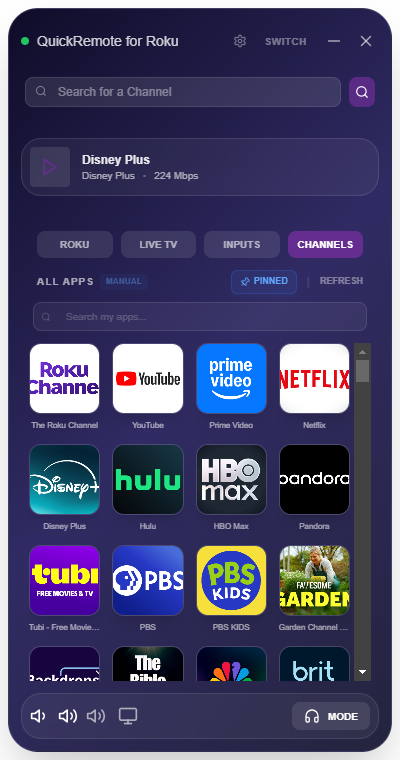
The new interactive Channels tab with pinned sorting locked and custom grid placement active.
⌨️ Hardware Media Key Routing: True Workspace Integration
One of the best parts of using a PC-based remote is the ability to adjust your entertainment center while you work on other tasks. Up until now, adjusting your TV volume or pausing a video meant clicking the on-screen buttons in the remote window. No more.
Version 1.3.1 introduces native routing for your keyboard's physical media keys (Play/Pause, Stop, Skip Next/Previous, Mute, Volume Up, and Volume Down). What makes this system truly unique is its contextual awareness:
- When Private Listening is ON: If you are streaming audio from your Roku TV directly to your computer's headphones, pressing your keyboard's Volume keys will adjust your local PC volume directly. This ensures that you can quickly protect your hearing or boost quiet dialogue without getting up.
- When Private Listening is OFF: If you are listening to your TV's built-in speakers or home theater system, pressing your keyboard's media keys will bypass your local PC controls entirely. The commands are instantly routed across your local network to your Roku TV, adjusting its hardware volume or pausing playback in real-time.
This means you can keep the remote minimized, focus on typing an email, and still pause your TV or turn down a commercial with a single tap on your physical keyboard. It is a level of integration that standard mobile remotes and physical controls simply cannot match.
📦 Under the Hood: The $1.29 Lifetime Value
QuickRemote continues to be built by an independent developer who values clean, native Windows engineering over bloated web wrappers and endless subscriptions. For a one-time purchase of just $1.29, you get immediate access to all of our core features: zero-config network discovery, multi-device management, cinematic 5.1 surround Private Listening, instant PC-to-TV clipboard pasting, and now, custom grid layouts and keyboard media key routing.
Take Absolute Control of Your Entertainment
Enjoy the ultimate workspace remote experience with channel pinning and keyboard media keys. Download the latest version of QuickRemote for Roku from the Microsoft Store today.
Get QuickRemote - Control Roku from Windows ($1.29)One-time purchase of $1.29. No ads. No subscriptions. Ever.